
How to create images like this using artificial intelligence
How to create images like this using artificial intelligence

by Imaginawalls
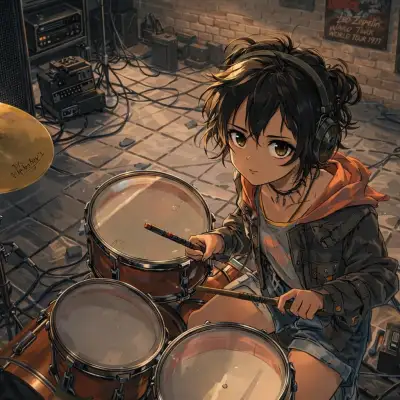
January 24, 2026 — 3 Min readHave you ever noticed how this illustration is so sharply defined and completely free of errors? At first glance, it might look like the work of a seasoned digital artist—but in fact, it was created with the help of artificial intelligence. In this post, I’ll walk you through the process I used to generate an image like this, combining the strengths of two powerful AI tools: MidJourney and DALL·E.
I started by using MidJourney, one of the most popular AI image generators known for its artistic flair and ability to interpret creative prompts with impressive visual coherence. MidJourney excels at producing highly stylized, detailed, and often painterly results—especially when guided by well-crafted prompts. But getting the perfect output often requires iteration. That’s where ChatGPT came in: I used it to refine my initial idea into a more precise and effective prompt, which I then fed into DALL·E to explore alternative compositions or fine-tune specific elements like lighting, perspective, or mood.
One powerful tip? You don’t even need to write your MidJourney prompt from scratch. You can use an AI language model—like ChatGPT or Claude—to generate a high-quality prompt based on a simple description. Just tell it what you’re envisioning (e.g., “a fox wearing traditional Brazilian renda renascença lace, standing in a sunlit São Paulo alley”), and it can craft a detailed, keyword-rich prompt optimized for MidJourney’s syntax.
Experts in AI-generated imagery often emphasize that while tools like MidJourney are incredibly capable, they’re not replacements for human creativity—they’re collaborators. As Dr. Emily Chen, a researcher in generative media, puts it: “The magic happens not in the AI alone, but in the dialogue between the creator’s vision and the model’s interpretation.” MidJourney’s strength lies in its ability to surprise you, to offer unexpected visual solutions that spark new ideas. But it’s your direction, your taste, and your refinement that turn a good image into a great one.
The magic happens not in the AI alone, but in the dialogue between the creator’s vision and the model’s interpretation. Dr. Emily Chen
So whether you’re designing wallpapers, illustrating stories, or experimenting with cultural motifs, remember: AI is your brush, not your brain. Use it to explore, iterate, and elevate your creative process—but always stay at the helm.
Ready to try it yourself? Start with a clear idea, let AI help you shape the prompt, and don’t be afraid to experiment. The perfect image might be just a few generations away.
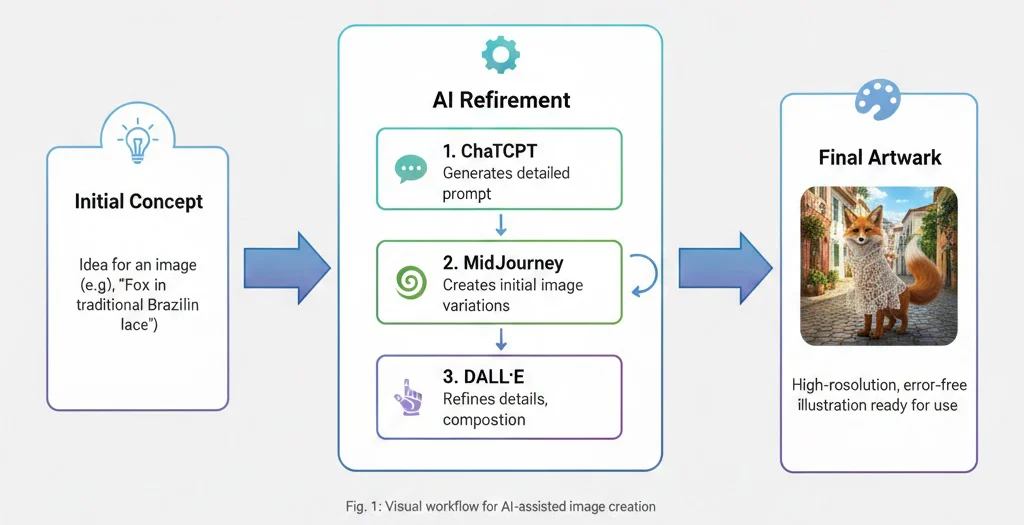
Tips for Better AI Image Generation
- Use descriptive adjectives: “cinematic lighting,” “hyper-detailed fur,” “soft morning glow.”
- Mention artistic styles: “anime-inspired,” “oil painting,” “Studio Ghibli aesthetic.”
- Specify cultural or regional details: “traditional Paraíban lace,” “urban Rio de Janeiro backdrop.”
- Avoid ambiguous terms—be precise about pose, expression, and composition.
And always remember: even the best AI tools can occasionally produce unintended or inappropriate content. If you're building a public-facing platform (like a wallpaper site), consider implementing moderation or filtering systems—especially when allowing user uploads or community prompts.
With the right approach, AI becomes not just a tool, but a true creative partner.
Share:




- Jan202624
How to create images like this using artificial intelligence
How to create images like this using artificial intelligence
- Jan202624
How to create images like this using artificial intelligence
How to create images like this using artificial intelligence