

The Ultimate Prompt Guide: How to Write Expert-Level Prompts for Jaw-Dropping AI Wallpapers (MidJourney + DALL·E Workflow)

by Imaginawalls
January 26, 2026 — 9 Min readThe Ultimate Prompt Guide: How to Write Expert-Level Prompts for Jaw-Dropping AI Wallpapers (MidJourney + DALL·E Workflow)
Have you ever seen a wallpaper that looks impossibly crisp—perfect edges, clean shapes, no weird anatomy, no random artifacts—and wondered, “How is this so polished?” A lot of the best AI wallpapers today aren’t made with a single prompt or a single tool. They’re made with a workflow: a repeatable method that combines strong prompting, deliberate iteration, and targeted refinement.
In this post, I’ll show you the prompt techniques most used by specialists (the ones that consistently generate premium-looking results), and I’ll mix them with the approach I use: a practical loop where ChatGPT helps shape and tighten the prompt, MidJourney generates high-style candidates, and DALL·E helps refine composition, fix details, or explore cleaner variations.
By the end, you’ll have a plug-and-play prompt structure for wallpapers, plus several ready-made examples you can adapt to your own themes—anime, minimal, cinematic, surreal, abstract, or ultra-realistic.
Why “Expert Prompts” Look Better
Most beginners write prompts like: “A futuristic city at night, wallpaper.” That can work—but it’s vague. Specialists add constraints, composition, camera language, lighting control, and negative instructions. The result is fewer mistakes and far more consistency.
Here’s the core mindset: AI is powerful, but it needs direction. Your prompt is the art director. The model is the production team.
The magic happens not in the AI alone, but in the dialogue between the creator’s vision and the model’s interpretation. Dr. Emily Chen
The Specialist Prompt Framework (Copy This)
When I want a wallpaper to look “final-art clean,” I almost always build the prompt in layers. This is the framework:
- Subject: what we’re looking at (and what matters most)
- Environment: where it is
- Composition: wide shot / centered / negative space for icons / rule of thirds
- Lighting: cinematic, soft glow, rim light, fog, sunrise, neon, etc.
- Style: anime clean line, photoreal, 3D render, ink, minimalist, etc.
- Quality cues: ultra-detailed, crisp edges, high contrast, sharp focus (or intentionally soft)
- Constraints: no text, no watermark, no logo, no extra objects, no distorted anatomy
Specialists also write prompts as if they’re describing a shot to a cinematographer—because the model responds extremely well to camera language and visual intent.
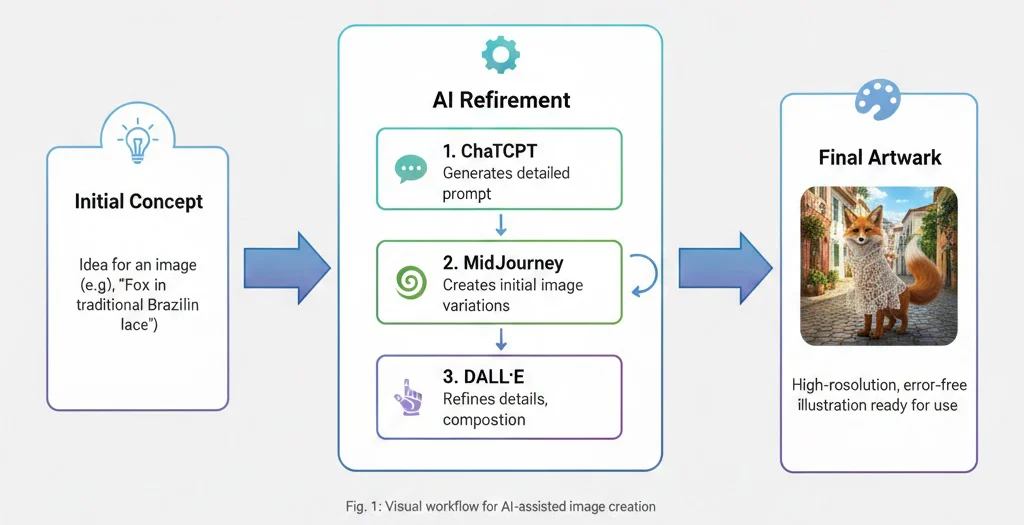
My Workflow: ChatGPT → MidJourney → DALL·E (Clean Results)
I start by using MidJourney, one of the most popular AI image generators known for its artistic flair and ability to interpret creative prompts with impressive visual coherence. MidJourney excels at producing highly stylized, detailed, and often painterly results—especially when guided by well-crafted prompts. But getting the perfect output often requires iteration.
That’s where ChatGPT comes in: I use it to refine a rough idea into a prompt that’s precise, structured, and optimized for the result I want (especially composition and constraints). Then I feed the refined prompt into MidJourney to generate multiple candidates.
Once I find the strongest base image, I bring DALL·E into the process to explore alternate compositions, create cleaner variations, or fine-tune specific elements like lighting, perspective, mood—or to fix small issues while keeping the original intent consistent.
Technique #1: Prompt “Compression” (Say More with Fewer Words)
One of the most common expert tricks is using dense, information-rich phrasing instead of long paragraphs. Instead of explaining everything, you list the “visual tokens” that matter most:
Example (dense): “minimalist night cityscape, soft neon reflections, rain-slick street, shallow depth of field, cinematic lighting, ultra-clean composition, negative space top-right, 4K wallpaper, no text, no logo”
This type of phrasing tends to produce more stable outputs because it reduces ambiguity.
Technique #2: Composition Control (The Wallpaper Trick)
Wallpapers are not posters. If you want a wallpaper that actually works on desktop/mobile, you need negative space and a clean focal point.
- Ask for center composition (great for mobile) or rule of thirds (great for desktop icons)
- Explicitly request negative space where UI elements will sit
- Request a simple background to avoid “busy noise”
Useful phrases: “clean background,” “minimal clutter,” “ample negative space,” “subject centered,” “balanced composition,” “icon-friendly wallpaper.”
Technique #3: Lighting as a Style Engine
Lighting is often the fastest way to change the mood without changing the whole concept. Specialists treat lighting like a controllable dial:
- Cinematic: “cinematic lighting, rim light, volumetric fog, high contrast”
- Dreamy: “soft glow, bloom, pastel ambience, gentle haze”
- Clean minimal: “soft studio lighting, smooth gradients, crisp edges”
- Neon: “neon signage, reflective surfaces, rain ambience, night scene”
Technique #4: Constraints + Negative Prompts (How Pros Avoid Errors)
This is where a lot of “expert polish” comes from. You must tell the model what not to do.
Common constraints: “no text,” “no watermark,” “no logo,” “no frame,” “no signature,” “no extra limbs,” “no distorted hands,” “no blurry face,” “no artifacts.”
For wallpaper websites (like ImaginaWalls), this matters even more: you want clean outputs that are safe, usable, and consistent.
Technique #5: The Iteration Loop (Small Changes, Big Gains)
Specialists rarely “one-shot” the perfect wallpaper. Instead, they run a loop:
- Version A: generate 4–8 options focusing on composition
- Version B: lock composition, refine lighting + style
- Version C: lock lighting, refine detail + cleanliness
Each iteration should change only one thing. If you change everything at once, you can’t tell what improved the output.
My Best “Prompt Builder” Trick (ChatGPT Does the Heavy Lifting)
One powerful tip? You don’t even need to write your MidJourney prompt from scratch. You can use an AI language model—like ChatGPT or Claude—to generate a high-quality prompt based on a simple description.
Just tell it what you’re envisioning (e.g., “a fox wearing traditional Brazilian renda renascença lace, standing in a sunlit São Paulo alley”), and it can craft a detailed, keyword-rich prompt optimized for MidJourney’s syntax—including composition control, lighting, style cues, and constraints.
My personal “ImaginaWalls-style” approach is to always request: clean composition, crisp shapes, and wallpaper-friendly negative space. This makes the output look more like a premium wallpaper and less like a random illustration.
Ready-to-Use Prompt Templates (Desktop + Mobile)
Template 1 — Clean Cinematic Wallpaper (Desktop):
[SUBJECT], [ENVIRONMENT], wide shot, balanced composition, ample negative space on the right, cinematic lighting, soft volumetric haze, crisp edges, high detail, realistic textures, 4K wallpaper, ultra clean, no text, no logo, no watermark
Template 2 — Minimalist Wallpaper (Mobile):
[SUBJECT], centered composition, minimal background, smooth gradients, soft studio lighting, clean shapes, subtle texture, calm mood, icon-friendly, 4K wallpaper, no text, no watermark, no logo
Template 3 — Anime Clean Line (Desktop):
[SUBJECT], [ENVIRONMENT], anime-inspired clean line art, subtle shading, crisp outlines, cinematic color grading, simple background, negative space top-left, high clarity, wallpaper composition, no text, no watermark, no logo
10 Example Prompts You Can Copy (Specialist Style)
- Neon Night City (Desktop): “rainy neon street, cyberpunk city, reflective asphalt, wide shot, rule of thirds, negative space on the left for icons, cinematic lighting, soft fog, ultra clean, crisp details, 4K wallpaper, no text, no watermark, no logo”
- Minimal Moon (Mobile): “single moon over calm gradient sky, centered composition, minimalist, smooth color transitions, soft glow, subtle grain, clean background, 4K mobile wallpaper, no text, no watermark, no logo”
- Japanese Garden + Digital Touch: “serene japanese garden at night, lanterns, gentle holographic accents, reflective pond, soft mist, cinematic lighting, balanced composition, negative space top-right, ultra clean, 4K wallpaper, no text, no watermark”
- Abstract Flow (Desktop): “abstract flowing shapes, soft gradients, subtle depth, clean modern design, centered composition, large negative space, ultra crisp edges, wallpaper aesthetic, 4K, no text, no watermark, no logo”
- Space Landscape (Desktop): “distant planet horizon, starfield, soft nebula glow, wide composition, clean silhouettes, cinematic lighting, high clarity, minimal clutter, 4K wallpaper, no text, no watermark”
- Cozy Tech Desk (Desktop): “night desk scene, laptop glow, warm lamp light, city bokeh background, shallow depth of field, balanced composition, negative space, cinematic lighting, ultra clean details, 4K wallpaper, no text, no watermark”
- Luxury Marble Minimal (Mobile): “minimal marble texture, soft shadow gradients, clean modern aesthetic, subtle highlights, centered composition, premium look, 4K mobile wallpaper, no text, no watermark, no logo”
- Nature Cinematic (Desktop): “mountain lake at sunrise, soft mist, gentle ripples, wide shot, balanced horizon, cinematic lighting, high detail, crisp realism, 4K wallpaper, no text, no watermark”
- Retro Futurism (Desktop): “retro-futuristic skyline, synthwave atmosphere, soft neon glow, clean geometry, wide shot, negative space, crisp edges, 4K wallpaper, no text, no watermark, no logo”
- Character Silhouette (Mobile): “single character silhouette, minimal scene, dramatic rim light, clean gradient background, centered composition, icon-friendly, ultra clean, 4K mobile wallpaper, no text, no watermark”
Tips for Better AI Image Generation
- Use descriptive adjectives: “cinematic lighting,” “hyper-detailed fur,” “soft morning glow.”
- Mention artistic styles: “anime-inspired,” “oil painting,” “Studio Ghibli aesthetic.”
- Specify cultural or regional details: “traditional Paraíban lace,” “urban Rio de Janeiro backdrop.”
- Avoid ambiguous terms—be precise about pose, expression, and composition.
- Always add constraints: “no text, no watermark, no logo” to keep it wallpaper-ready.
- Iterate with intent: change one variable per generation (composition → lighting → detail).
Safety + Platform Quality Note (Important for Wallpaper Sites)
Even the best AI tools can occasionally produce unintended or inappropriate content. If you're building a public-facing platform (like a wallpaper site), consider implementing moderation or filtering systems—especially when allowing user uploads or community prompts.
So whether you’re designing wallpapers, illustrating stories, or experimenting with cultural motifs, remember: AI is your brush, not your brain. Use it to explore, iterate, and elevate your creative process—but always stay at the helm.
Ready to try it yourself? Start with a clear idea, let AI help you shape the prompt, and don’t be afraid to experiment. The perfect image might be just a few generations away.
Next post idea (teaser): In the next article, I’ll show you how to optimize wallpapers for desktop vs mobile (exact resolutions, crops, and how to design “icon-friendly” compositions that actually look good on real screens).